
You manage Windows servers, Active Directory, MSSQL, and PowerShell runbooks. You need to automate server provisioning, user management, database maintenance, compliance checks — and you need version control, approval workflows, and audit trails around all of it.
The usual answer is "install Docker" or "set up WSL2." But your PowerShell scripts need access to AD, your MSSQL queries use Kerberos tickets from the domain, and your modules come from private Azure Artifacts feeds. Containerizing all of that means fighting your own infrastructure.
Windmill runs as a native Windows service — windmill-ee.exe registered via sc.exe, executing PowerShell, C#, and SQL directly on your domain-joined servers. This post walks through what that enables: typed PowerShell with [CmdletBinding()], MSSQL with Kerberos auth, Teams approvals, and AI agents that use all of the above as tools.
Native Windows workers
Windmill's Windows worker is a single executable — windmill-ee.exe. It runs on any Windows machine: servers, workstations, laptops, edge devices — anywhere Windows runs and you need automation close to the infrastructure. Three modes:
- Worker: connects directly to the Windmill database, executes jobs
- Server: runs the Windmill API and web UI
- Agent: connects to a remote Windmill server over HTTPS — no direct database access, ideal for workers behind firewalls. See agent workers for how to generate tokens
Installing as a Windows service
sc.exe create WindmillWorker `
  binPath= "C:\windmill\windmill-ee.exe" `
  start= auto `
  DisplayName= "Windmill Worker"

$regPath = "HKLM:\SYSTEM\CurrentControlSet\Services\WindmillWorker"
$envVars = @(
    "MODE=worker",
    "DATABASE_URL=postgres://postgres:changeme@10.0.0.5:5432/windmill?sslmode=disable",
    "WORKER_TAGS=powershell,csharp,mssql",
    "SKIP_MIGRATION=true"
)
Set-ItemProperty -Path $regPath -Name "Environment" -Value $envVars -Type MultiString
Agent mode (connecting to a remote server without database access):
sc.exe create WindmillAgent `
  binPath= "C:\windmill\windmill-ee.exe" `
  start= auto `
  DisplayName= "Windmill Agent"

$regPath = "HKLM:\SYSTEM\CurrentControlSet\Services\WindmillAgent"
$envVars = @(
    "MODE=agent",
    "BASE_INTERNAL_URL=http://your-windmill-server:8000",
    "AGENT_TOKEN=jwt_agent_your_token_here"
)
Set-ItemProperty -Path $regPath -Name "Environment" -Value $envVars -Type MultiString
Configure automatic restart on failure:
sc.exe failure WindmillWorker reset= 86400 actions= restart/60000/restart/60000/restart/60000
sc.exe start WindmillWorker
NSSM is also supported as an alternative service manager.
Mixed Windows/Linux fleet
A single Windmill instance can run both Linux and Windows workers. Use worker tags to route jobs — tag your Windows workers with powershell, csharp, or windows, and flows dispatch steps to the right OS automatically.
PowerShell as a first-class language
Windmill parses param() blocks to infer typed parameters and generates a UI form automatically. PowerShell scripts get the same capabilities as Python or TypeScript: schedules, webhooks, approval flows, error handling, and composition in flows.
Querying Active Directory
param(
    [string]$GroupName,
    [string]$Domain = "corp.contoso.com"
)

Import-Module ActiveDirectory

$members = Get-ADGroupMember -Identity $GroupName -Server $Domain |
    Select-Object Name, SamAccountName, ObjectClass |
    ForEach-Object {
        [PSCustomObject]@{
            name = $_.Name
            username = $_.SamAccountName
            type = $_.ObjectClass
        }
    }

$members | ConvertTo-Json
$GroupName becomes a required text input, $Domain gets a default value — auto-generated in the Windmill UI. The JSON output is directly consumable by downstream flow steps.
CmdletBinding and common parameters
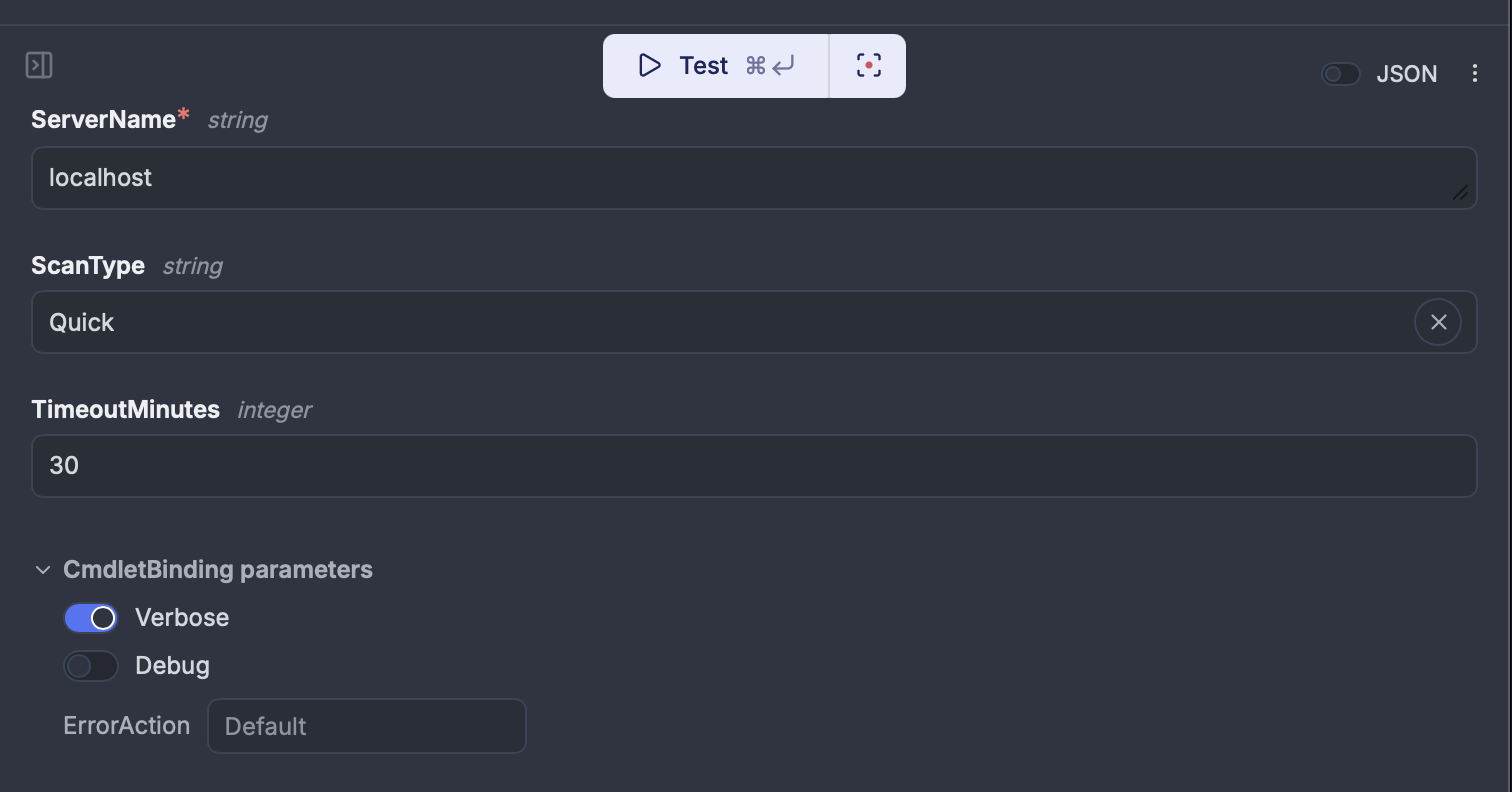
When a script declares [CmdletBinding()], Windmill shows toggles for -Verbose, -Debug, and an -ErrorAction dropdown in the run form — the same common parameters you'd use in a PowerShell console. Write-Verbose and Write-Debug output appears in job logs with VERBOSE: / DEBUG: prefixes. Scripts without [CmdletBinding()] are unaffected.
[CmdletBinding()]
param(
    [Parameter(Mandatory=$true)]
    [string]$ServerName,

    [ValidateSet("Full", "Quick", "Security")]
    [string]$ScanType = "Quick"
)

Write-Verbose "Starting $ScanType scan on $ServerName"
$result = Invoke-ServerScan -Server $ServerName -Type $ScanType
Write-Debug "Raw result: $($result | ConvertTo-Json -Depth 1)"
$result | ConvertTo-Json
Private Azure Artifacts modules
Configure your Azure Artifacts feed URL and PAT in instance settings, then use Import-Module as usual — Windmill checks the private feed first and falls back to PowerShell Gallery.
param(
    [string]$ServerName,
    [string[]]$Checks = @("cpu", "memory", "disk")
)

Import-Module CompanyInternalTools

$results = Invoke-ServerHealthCheck -ServerName $ServerName -Checks $Checks
$results | ConvertTo-Json
MSSQL with Kerberos
Windmill's MSSQL integration supports three auth methods: SQL auth (username/password), Azure AD/Entra (OAuth), and Windows Integrated Authentication (Kerberos).
With Kerberos, the worker's service account credentials are used directly — no database passwords stored in Windmill. The worker inherits its domain identity, and MSSQL trusts it through AD.
Requirements:
- Valid Kerberos ticket on the worker (via
kinitor a keytab) - Correct
krb5.confrealm configuration - Service account permissions on the target database
Resource config
{
  "host": "sql01.corp.contoso.com",
  "dbname": "AppDatabase",
  "integrated_auth": true,
  "encrypt": true,
  "trust_cert": false
}
No user or password fields. Then query with a SQL script:
-- database u/admins/mssql_kerberos
SELECT
    e.EmployeeID,
    e.DisplayName,
    e.Department,
    e.LastLogin
FROM HR.Employees e
WHERE e.Department = $1
  AND e.IsActive = 1
ORDER BY e.LastLogin DESC
The -- database directive pins the script to the Kerberos-authenticated resource.
C#/.NET 9
C# scripts run natively with .NET 9. NuGet dependencies are declared inline and resolved automatically.
//requirements:
//Azure.Storage.Blobs@12.22.2

using Azure.Storage.Blobs;
using Azure.Storage.Blobs.Models;

public class Main
{
    public static async Task<object> main(
        string connectionString,
        string containerName,
        string blobName)
    {
        var client = new BlobServiceClient(connectionString);
        var container = client.GetBlobContainerClient(containerName);
        var blob = container.GetBlobClient(blobName);

        BlobDownloadResult result = await blob.DownloadContentAsync();
        string content = result.Content.ToString();

        return new {
            blob_name = blobName,
            size_bytes = result.Details.ContentLength,
            content_type = result.Details.ContentType,
            last_modified = result.Details.LastModified
        };
    }
}
On a Windows worker this runs on the installed .NET runtime with full access to Windows APIs and the local filesystem.
Microsoft ecosystem integrations
Teams
Windmill's Teams integration covers three patterns:
Commands: /windmill triggers in Teams channels execute scripts on any worker, including Windows workers, and reply with results.
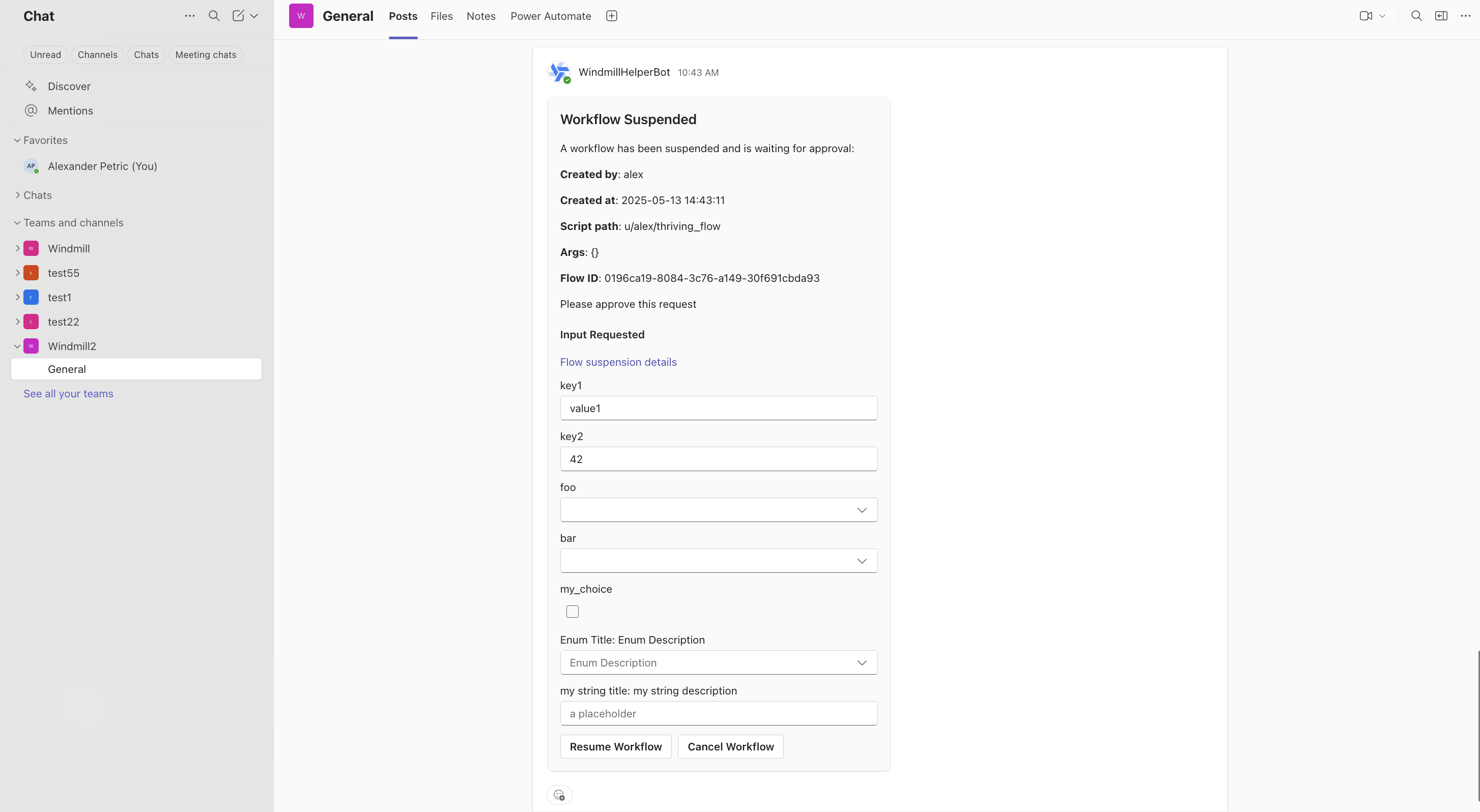
Approval steps: flows pause and request approval in a Teams channel. Approvers can approve, reject, or modify parameters inline.
await wmill.requestInteractiveTeamsApproval({
    teamName: "Infrastructure",
    channelName: "Approvals",
    message: "Server decommission request: SRV-DB-03",
    approver: "ops-lead",
    defaultArgsJson: { server: "SRV-DB-03", action: "decommission" },
    dynamicEnumsJson: { action: ["decommission", "reboot", "snapshot"] },
});
Error alerts: flow failures send notifications to Teams with full error context.
Azure AD/Entra ID SSO
Windmill supports SSO via Azure AD OAuth. The same identity can authenticate against MSSQL using aad_token — one login for platform access and database access.
Azure Blob Storage
Native Azure Blob integration for file operations in flows.
Kafka with GSSAPI/Kerberos
Enterprise Kafka clusters in AD environments often use Kerberos. Windmill's Kafka triggers support SASL_GSSAPI and SASL_SSL_GSSAPI with keytab support (file path or base64-encoded):
kerberos_service_name: kafka
kerberos_principal: windmill-svc@CORP.CONTOSO.COM
keytab_path: /etc/security/keytabs/windmill.keytab
AI agents on Windows infrastructure
Most AI agent platforms can call REST APIs. Few can natively run PowerShell on domain-joined servers or query MSSQL with Kerberos auth.
Windmill's AI agent flow steps use scripts as tools. Any Windmill script — PowerShell, C#, SQL, TypeScript — becomes a callable tool where typed parameters map to the tool's JSON schema. The agent sees what each tool does, what inputs it needs, and calls them to accomplish a goal.
Scenario: AI IT ops assistant
An AI agent in a Windmill flow with these tools:
- A PowerShell script that queries AD for user/group information
- A PowerShell script that checks Windows Event Logs
- An MSSQL query that pulls application error data
- A Teams notification script for escalation
The agent receives a natural-language request — "check if user jsmith's account is locked and what errors their app generated today" — reasons about which tools to call, executes them on the Windows worker, and returns a structured report or escalates via Teams.
Each tool is a regular Windmill script. Here's the AD lookup tool — the agent calls it by name and fills in the $Username parameter:
[CmdletBinding()]
param(
    [Parameter(Mandatory=$true)]
    [string]$Username
)

Import-Module ActiveDirectory

$user = Get-ADUser -Identity $Username -Properties LockedOut, LastLogonDate, MemberOf, Enabled
Write-Verbose "Querying AD for user: $Username"

[PSCustomObject]@{
    username    = $user.SamAccountName
    locked_out  = $user.LockedOut
    enabled     = $user.Enabled
    last_logon  = $user.LastLogonDate
    groups      = ($user.MemberOf | ForEach-Object { ($_ -split ',')[0] -replace 'CN=' })
} | ConvertTo-Json
In the flow editor, the agent step wires these tools together with a system prompt and iterates over affected users:
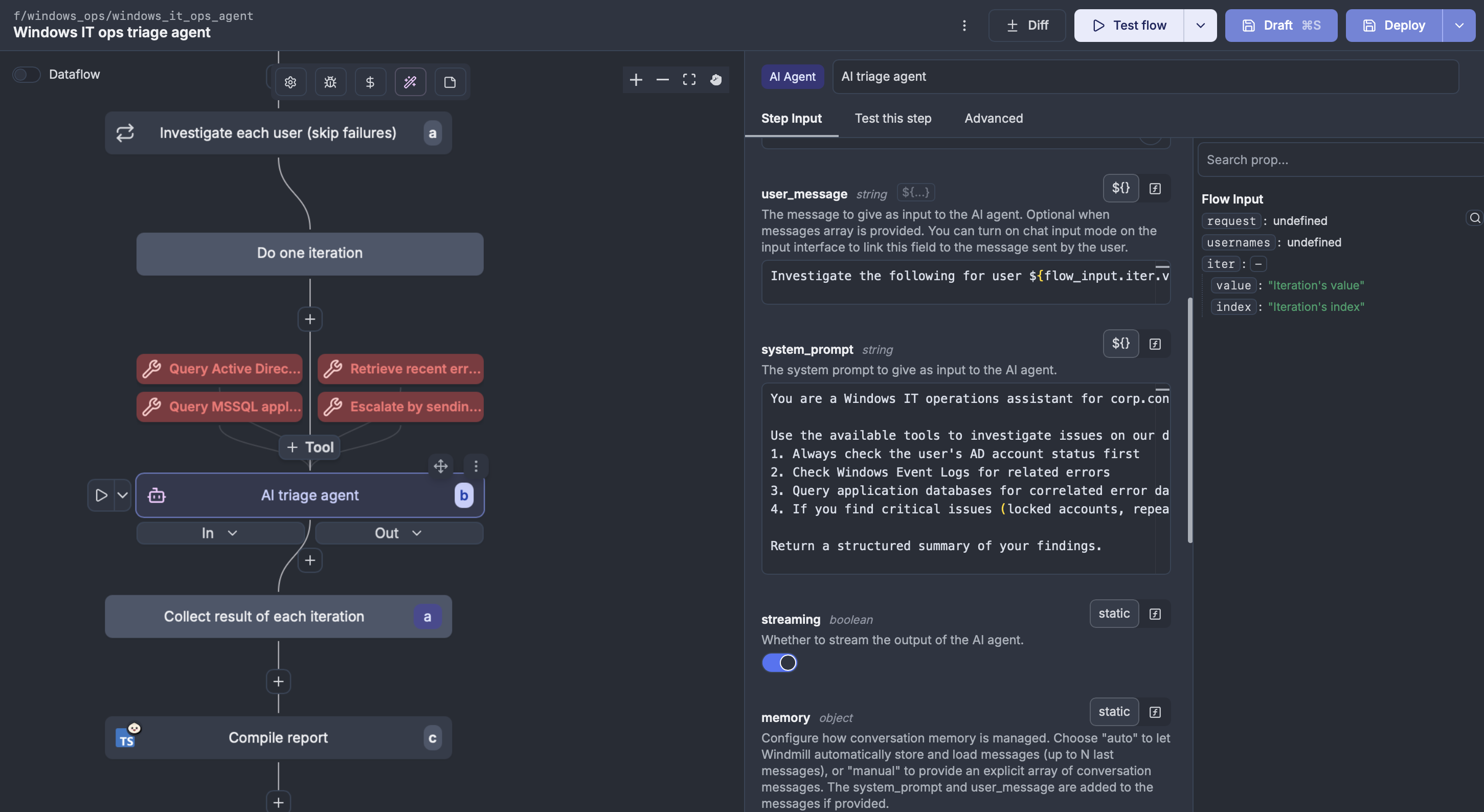
The agent calls get_ad_user_info, sees the account is locked, calls get_event_log_errors to check for related authentication failures, runs query_app_errors for today's errors, and compiles a report. If it finds critical issues, it calls send_teams_alert to escalate. Each tool runs on the appropriate worker — PowerShell and MSSQL on the Windows worker with domain credentials, TypeScript on any available worker.
Multi-provider and MCP
Windmill's agents work with OpenAI, Anthropic, Azure OpenAI (for Microsoft shops needing data residency), Mistral, and others. Windmill also exposes itself as an MCP server, so external AI tools (Claude, Cursor) can trigger scripts on your Windows infrastructure:
claude mcp add --transport http windmill https://windmill.corp.contoso.com/api/mcp/w/prod/mcp?token=your_token
Replacing Task Scheduler and Power Automate
The typical migration path: PowerShell scripts scattered across servers on Task Scheduler, Power Automate for approvals, alerts via email, no audit trail.
In Windmill, each script becomes version-controlled, gets an auto-generated UI, and can be composed into flows with approval steps (via Teams), error handling, and retries. Windows and Linux workers run in the same instance. Every execution is logged with inputs, outputs, duration, and who triggered it.
The migration is incremental — start with one runbook, schedule it in Windmill, and let the Task Scheduler job run in parallel until you're confident.
How Windmill compares on Windows
Airflow has an open issue for Windows support since 2020 — not on the roadmap. Prefect workers can run on Windows via pip, but the docs focus on Docker/Kubernetes and there's no service management. n8n runs well via Node.js but is low-code and connector-focused. Kestra is the closest — it runs as a JAR, has a PowerShell plugin, and supports a PROCESS runner — but lacks typed parameter inference, private Azure Artifacts, MSSQL Kerberos, and C# support.
Power Automate has strong Teams integration, but no self-hosted option, no version control, no code-first workflow definition, and premium licensing at $15/user/month — which means no GitOps, no PR reviews on flow changes, and no self-hosted deployment.
| Capability | Windmill | Kestra | n8n | Airflow | Prefect | Power Automate |
|---|---|---|---|---|---|---|
| Runs on Windows | Native service | JAR file | Node.js | No (WSL only) | Partially | Cloud only |
| Windows service mgmt | sc.exe/NSSM | No | No | No | No | N/A |
| PowerShell typed params | Yes + CmdletBinding | Basic plugin | No | No | No | Actions only |
| C#/.NET scripts | Yes (.NET 9) | No | No | No | No | No |
| MSSQL Kerberos auth | Yes | No | No | No | No | Via connector |
| Kafka GSSAPI/Kerberos | Yes | Plugin | No | No | No | Via connector |
| Code-first | Yes | Yes | Low-code | Yes | Yes | No |
| Version control | Git-native | Git-native | Git | Git-native | Git-native | No |
| Self-hosted | Yes | Yes | Yes | Yes | Yes | No |
Getting started
The Windmill server runs in Docker (Linux). Windows workers connect as native agents — no Docker on the Windows side.
- Deploy the Windmill server (Docker Compose or Kubernetes)
- Download
windmill-ee.exeon your Windows server - Register it as a Windows service in agent mode
- Connect with an agent token
Windows workers require an Enterprise license.

You can self-host Windmill using a
docker compose up, or go with the cloud app.